


Music player
4.722.53K Reviews
App Specs
- Version
- 246.02
- Updated On
- License
- Free
- Downloads
- 100,000,000+
- Developer
- recorder & smart apps
- Categories
- Music & Audio
- Platform
- Android, iOS
Screenshots
 Analysis by AppCompare
I first reach for a local music player when I want my own files to work without building a routine around a streaming subscription. This app is aimed at that straightforward need: playing music stored on a phone, with tools for tidying up audio tags and trimming clips. I’d consider it when my library is a mix of old downloads and newer tracks, but I would not treat it as a replacement for a streaming service or a cloud music collection.
Who this player suits
The practical appeal is having a place to browse and play music files already on your device. If you keep albums for offline listening, collect tracks from different sources, or want to make a short audio cut, a dedicated player can be more convenient than opening files one at a time. The app is free to install, with optional in-app purchases listed at $5.99 per item, so I would try the basic experience before deciding whether any paid option matters to me.
A realistic use would be loading a few albums before a commute, then using the player rather than searching through a general file manager whenever I want to change tracks. The value is less about discovering new music and more about making a personal collection easier to use. If most of my listening already happens through an online service, I would probably stick with that service for its recommendations and licensed catalogue instead.
Trust starts with a clear purpose
The app is published by recorder & smart apps and sits in the music and audio category. Its large audience—over 100 million installs and an average rating of 4.7 from around 2 million ratings—suggests that many people use it, but popularity alone is not a privacy guarantee. I prefer to judge a music app by what I can see and control while using it, rather than assuming that a high rating answers questions about data handling.
For a local player, the moments I would pay attention to are the ones involving access to audio files, editing metadata, and cutting a track. Those actions have an obvious relationship to the app’s purpose. I would still read the permission prompts on my own device and grant only what makes sense for the task at hand. I would not infer a particular privacy practice from the app’s music features or its popularity.
Useful choices before a listening session
One helpful habit with any local library is to check track names and artist details before making playlists or searching later. If a file’s tags are messy, editing them can save time across future listening sessions: a consistent artist name makes an album easier to find, while correcting a track title avoids a library full of vague filenames. I’d make small corrections as I notice them instead of trying to reorganize everything at once.
Audio trimming is another focused tool, but it calls for care. I would keep the original file untouched when possible and listen to the edited result before relying on it. A short cut can be handy for extracting a section for personal use or removing an unwanted lead-in, yet it is not a substitute for a full audio editor when I need precise production controls. That distinction helps set realistic expectations for a utility built around everyday playback.
Worth Reading Before You Choose

Baby Panda World Brings Quick Play to Modern Phones, but Its Game Library Feels Busy

ESPN’s Live Game View Makes Following Close Games Easier

QuizzLand Review: A Good Fit for Short Trivia Breaks, Not Every Player

Basketball Stars: Multiplayer Is Fast, but Can It Recover When Matches Go Wrong?

WEBTOON Turns Phone Updates Into a Better Reading Routine

Link to Windows Runs on Shared Habits, Not Social Feeds
Where it sits among alternatives
Compared with a streaming app, a local player is useful when I already have the files and want direct access without browsing a subscription catalogue. Compared with a basic file manager, a dedicated music app is the more natural place to play a collection and make listening-oriented changes. The trade-off is that local playback depends on having music available on the device; it does not solve the separate problem of finding or licensing tracks.
I would also think about how portable my library needs to be. If I regularly switch phones or want playlists and listening history to follow me automatically, a cloud-based music service may be a better fit. If I mostly listen to a stable collection on one device, a local player can be simpler. Before relying on any app for a long trip, I’d test a few files in advance and confirm that the library is accessible in the way I expect.
Room for a cautious first try
The app is rated for Everyone, and its current version is 235.01, with Android support beginning at version 5.0. Those details make it relevant to a broad range of Android users, though the phone’s own settings and available storage still shape the experience. I’d start by adding or locating a small part of my collection, checking that the tracks appear as expected, and only then spend time correcting tags or building playlists.
One point I would not overlook is the difference between playback and library management. A player can make existing files easier to hear, but it cannot fix missing files or make an incomplete collection complete. Likewise, editing a tag changes how a file is labelled; it does not necessarily organize the file folders on the device in the way I want. Keeping those jobs separate prevents disappointment when a neatly named song still sits in an untidy folder.
First Impressions
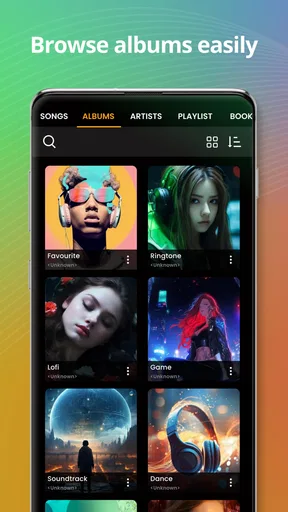
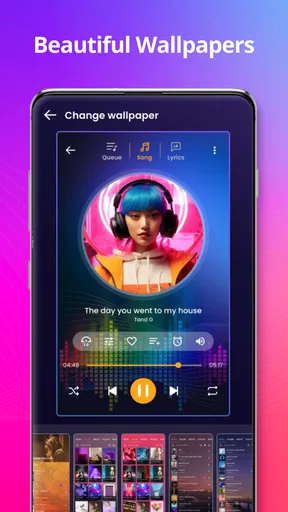
From the moment I opened the music player app, I was greeted by a sleek and intuitive interface. It’s the kind of design that makes you want to dive in and start exploring immediately. The app's visuals are clean, with a dark mode option that’s easy on the eyes for those late-night jam sessions. Navigating the app felt like a breeze, with everything exactly where you’d expect it to be.
Features That Hit the Right Note
One of the first things that caught my attention was the app's ability to support a wide range of audio formats. Whether you have MP3s, FLAC, or even those old WAV files, this player handles them seamlessly. It’s like having a universal translator for your music library.
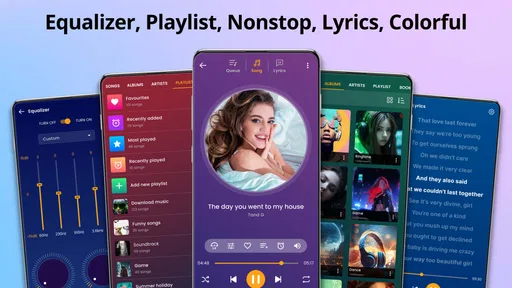
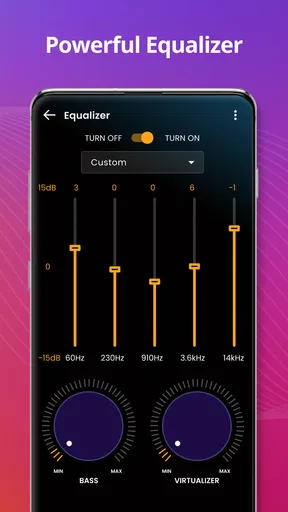
Another feature I loved was the customizable equalizer. You can fine-tune your audio experience with presets or go fully manual to get that bass just right. For someone like me who loves a punchy bass, this was a game changer. Plus, the app remembers your settings, so you don’t have to tweak it every time you press play.
Playlists and Personalization
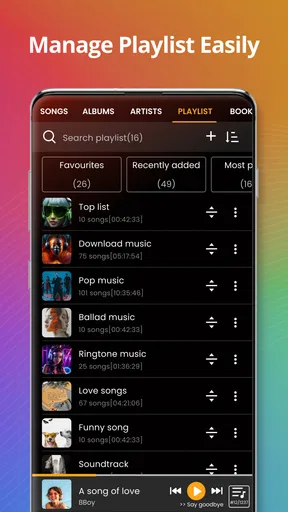
Creating playlists is a piece of cake. The app learns your music taste over time, suggesting songs and creating mixes that fit your mood. It’s like having a personal DJ who knows exactly what you need to hear. And, if you’re into sharing, you can easily export and share playlists with friends, making it a breeze to spread the love.
Offline Mode and Streaming
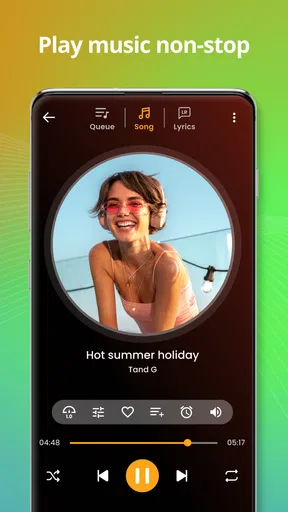
This app also offers a robust offline mode. You can download your favorite tracks and listen to them without burning through your data plan. It's perfect for those long flights or when you're off the grid. On the flip side, if you’re always connected, the streaming quality is top-notch, rivaling some of the big names in the industry.
Integration and Compatibility
The app integrates smoothly with other devices and platforms. Whether you’re using Bluetooth speakers, headphones, or even your car’s audio system, the connection is stable and hassle-free. Also, it syncs with smart home devices, so you can control your music with voice commands. Talk about convenience!
Final Thoughts
After spending some quality time with this music player app, I can confidently say it's a must-have for any music lover. It combines functionality with a user-friendly interface, ensuring you spend more time enjoying your tunes and less time fiddling with settings. Whether you’re an audiophile or just someone who loves to have a soundtrack to their day, this app delivers.
So, if you’re in the market for a reliable, feature-packed music player, give this one a spin. It might just become your new favorite way to experience music.
Pros
- User-friendly interface for easy navigation.
- Supports multiple audio formats seamlessly.
- Customizable equalizer settings enhance sound.
- Offline playback without data usage.
- Minimal battery consumption during use.
Cons
- Ads can interrupt playback occasionally.
- Premium features locked behind paywall.
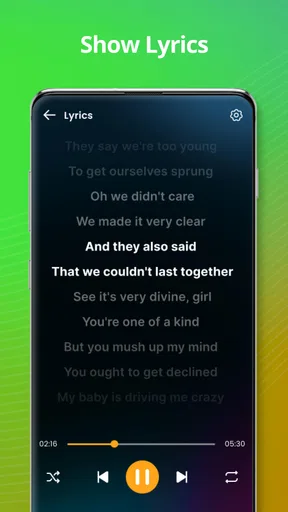
- No built-in lyrics feature available.
- Limited customization for app themes.
- Playlist creation could be more intuitive.
FAQs for Music player
What features does the Music Player app offer?
The Music Player app offers a range of features including customizable playlists, an equalizer with various presets, offline listening, and support for multiple audio formats. Users can also enjoy seamless integration with streaming services and a sleek, user-friendly interface that enhances the listening experience.
Is the Music Player app compatible with all devices?
The app is compatible with most Android and iOS devices. It requires a minimum version of the operating system, which is typically listed on the app store download page. For optimal performance, it is recommended to use the app on devices with sufficient storage and RAM.
Does the Music Player app support offline listening?
Yes, the Music Player app supports offline listening. Users can download their favorite tracks and playlists directly onto their device, allowing them to enjoy music without an internet connection. This feature is particularly useful for saving on data usage and ensuring uninterrupted playback.
Are there any subscription fees or in-app purchases?
The app is free to download but offers premium features through a subscription model. These may include ad-free listening, additional themes, and advanced audio enhancements. Users can choose to purchase these features individually or as part of a monthly or yearly subscription plan.
How does the Music Player app ensure user privacy and security?
The Music Player app prioritizes user privacy by implementing robust security measures. It requires minimal permissions, ensuring that your personal data remains safe. Additionally, the app complies with industry standards and privacy regulations, providing a secure environment for music enthusiasts.


